



Key Takeaways
- Phishing emails are one of the most common and effective types of cyberfraud and are often the starting point for broader online scams and cyberattacks.
- Attackers rely on social engineering, urgency and lookalike email addresses or links to trick you into sharing sensitive information or clicking malicious content.
- You can verify email authenticity by carefully checking sender domains, inspecting links without clicking and treating unexpected attachments with extra caution.
- Tools such as advanced email filters, antivirus software and multifactor authentication can significantly reduce your risk.
- Regular information security training and phishing simulations create awareness and improve email habits.
- Building strong cyber hygiene routines — from password management to regular software updates and family education — helps protect your identity, finances and professional reputation over the long term.
Understanding Phishing Emails
To avoid falling victim to phishing email scams, it’s important to understand what they are and how to spot them. Most phishing attacks rely less on hacking software and more on manipulating people — a tactic often called social engineering.
Many attackers attempt to manipulate victims through psychological and social engineering phishing tactics. Common strategies include creating a sense of urgency or fear through fake account alerts; exploiting authority by impersonating banks, investment firms, payroll providers, school administrators or the IRS; and using intimidating language that pressures you to act quickly.
AI tools now enable more personalized, grammatically correct emails that match the tone of legitimate companies’ communications, making these phishing messages more convincing and increasingly difficult to spot. When attackers use information from social media or previous data breaches to target a specific individual or organization with a customized email, it’s called spear phishing.
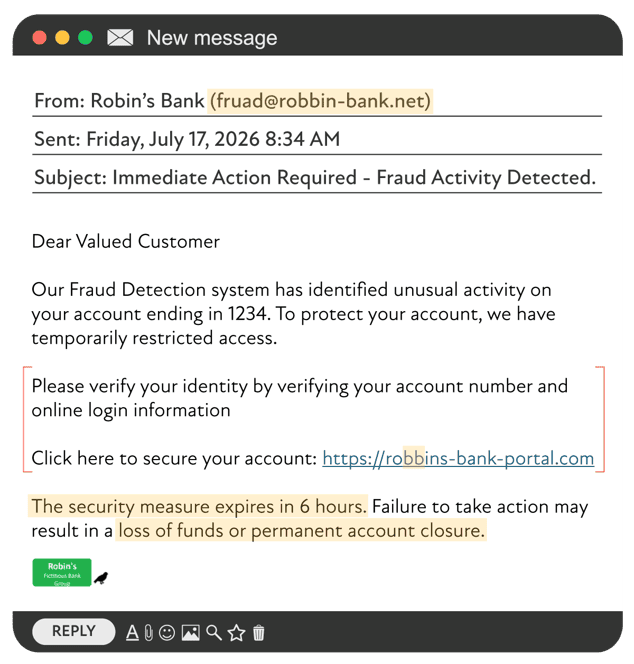
Even with AI and better writing, there are still red flags you can look for in a phishing email. Watch for generic greetings, such as “Dear Valued Customer” instead of your name, slightly altered or unfamiliar email addresses, unexpected messages about invoices or account changes, urgent or threatening language, requests for login credentials or other sensitive data, and demands to click a link or download an attachment to avoid a negative consequence.
Especially if you notice more than one of these signs in the same message, treat it as suspicious and proceed with extreme caution. For more examples of how phishing scams target businesses in particular, you can review our article on online and offline phishing scams.
Verifying Email Authenticity
Before responding to or taking action on an email message, it’s important to verify its authenticity. A quick pause to double-check can save you from a costly mistake and is a core part of good email security and overall cybersecurity practices.
Step 1 – Determine if it’s out of the ordinary or unexpected
Scammers will send emails to you that are somewhat of a surprise to try to grab your attention and get you to act prior to thinking it through.
In the example above, not only would the email be unexpected, but the action it’s asking you to take is out of the ordinary. In a real scenario, a bank wouldn’t ask you to click a link. If a bank suspects fraud, they’ll ask you to contact them via phone. Also, don’t call a phone number provided in the email; always find the phone number listed on the bank’s website.
Step 2 – Check who really sent it
Start by checking the sender’s full email address by hovering over — not clicking on — the “From” field. Carefully review the email address for slight deviations from a legitimate email address, such as extra numbers or letters, misspellings like “arnazon.com” instead of “amazon.com,” or unusual domains that don’t match the organization’s official website. If the email claims to be from your bank, your child’s school, your employer, your financial advisor or a government agency but the domain doesn’t match what you normally see, that’s a strong sign something’s wrong.
In the example above, the bank is Robin’s Fictitious Bank. However, if you look at the email address, there’s a double B in Robin and “fraud” has the a and u reversed.
Step 3 – Inspect links without clicking
To verify a link’s legitimacy, hover over the link without clicking to view its destination. Make sure the domain matches the organization’s official site, that there are no strange subdomains or extra words before the brand name and that the URL isn’t hidden behind a shortened link you weren’t expecting. Never click on a malicious link, as it could lead to a fake login page designed to steal your login credentials or install malware on your device. Instead, manually type the organization’s official domain name into your browser or use a trusted bookmark.
Again in the example above, the link has a double B in Robins.
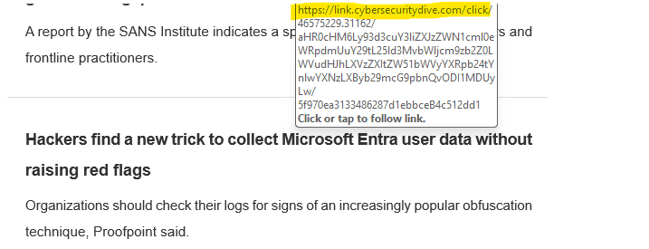
Many times, the actual address is hidden within a link. However, if you hover over the address, it should display where it’s trying to take you.
In this example, the link just says “Hackers find a new trick to collect Microsoft Entra user data without raising red flags” — it doesn’t really tell you where the link will take you. When you hover over it, it shows the destination is a news article.
Step 4 – Handle attachments carefully
It’s critical to scan all attachments with antivirus software prior to opening them and to avoid enabling macros in documents from unknown sources. If you receive a file you weren’t expecting — even from someone you know — confirm through another communication channel, such as a phone call or text, that the attachment is legitimate before opening it, especially if the email mentions credit card information, bank details or other confidential information.
Before you click or reply, ask yourself a few quick questions: Do you recognize the sender, and does the email address look right? Were you expecting this message or attachment? Does the email ask for sensitive information or one-time codes? Do the links point to the official website? Would you feel more comfortable going directly to the website or app instead of using the email?
You can further protect yourself by turning on multifactor authentication across your email and financial accounts, which adds another layer of protection even if someone does get your password.
Step 5 – Inbound message verification from a known source
If an email seems unusual, urgent or out of character, don’t reply directly. Instead, contact the sender through a verified phone number, official website or known app to confirm the message is real.
This same principle applies to QR codes and download requests. Be wary of QR codes from unknown sources, as they may bypass your email’s link scanning system and send you to a malicious site.
If you have any doubt, call the sender and ask.
Tools and Software for Phishing Attack Prevention
There are numerous tools that can help detect and prevent phishing attacks before fraudulent emails reach your inbox. While tools can’t replace common sense, they can dramatically reduce the number of malicious emails that ever reach you.
In addition to phishing attack prevention, phishing simulation tools can play a key role in helping organizations raise awareness and identify weaknesses before an attack occurs. These platforms send safe “test” phishing emails and coach users on what to look for, which can be especially useful for corporate employees and small business teams.
A Proactive Approach to Protection
The most effective way to avoid falling victim is to take a proactive approach to protecting yourself, your family and your contacts from phishing scams and other cyberthreats. The best results usually come from combining strong account protections, careful message verification and healthy device and network habits.
Account access protocols
Use strong, unique passwords for every account, ideally 12-16 characters long and built with a mix of letters, numbers and symbols. Current password best practices emphasize length over complexity. Resist the urge to reuse passwords across sites, especially for email and financial logins that store personal information and contact information. A password manager can make this much easier by generating and storing secure credentials for you.
It’s also important to enable multifactor authentication (MFA) on all accounts. MFA is one of the most effective prevention tools, because it requires a second form of verification in addition to your password and makes it harder for attackers to use stolen login credentials from a successful phishing attempt. Whenever possible, don’t use MFA via a text message and instead use an authenticator application. For business accounts, ensuring your domain uses authentication protocols can help block scammers from spoofing your name.
Network and device hygiene
Promptly update all apps, software and devices with the latest version available. Enable automatic updates on your operating system, browser, apps and antivirus software, as new versions often close vulnerabilities that attackers have learned to exploit to deliver malicious attachments or other phishing tactics.
Avoid sending confidential information over public Wi‑Fi connections unless you’re using a reputable VPN. It’s also wise to ensure your home and office networks are protected by firewalls, segmented Wi‑Fi networks and strong security settings so that your overall data security posture remains strong. To protect your personal data beyond the inbox, you may find our piece on the best practices for avoiding identity theft helpful.
Finally, make it a habit to review your financial and online accounts regularly for suspicious activity or unexpected changes to contact details. Catching a problem early can limit the damage.
Cyber Hygiene and Internet Safety
The term “cyber hygiene” refers to the routine practices that maintain digital health, much like how personal hygiene helps maintain physical health. Maintaining strong cyber hygiene is critical for building resilience against evolving threats and is an important part of internet safety for both adults and kids — especially as more of your life moves through email, text messages, social media and online accounts that store sensitive information.
Daily habit
Run a quick email scan with a “verify first” mindset before opening messages. At the end of the day, do a brief review of your sent folder and account activity logs so that you can catch unusual behavior early.
Immediate action
Treat unexpected MFA prompts seriously. If you receive a multifactor authentication notification or push code you didn’t initiate, deny it immediately and change your password.
Weekly routine
Set aside a few minutes each week to install software updates and review your password manager for weak or reused credentials. Make sure to reinforce the same habits with your family. Teaching children and other loved ones these routines can improve digital literacy and strengthen your household’s overall internet safety posture.
Integrating these habits into your routine can significantly strengthen your defenses against phishing attempts and other cyberthreats. Consistent vigilance can help protect your financial peace of mind, personal information and professional reputation. If you’d like to understand how phishing fits into the wider scam landscape, see our overview of common financial scams and how to avoid them.
FAQ: Common Misconceptions About Phishing Emails
Don’t be fooled by common misconceptions. Learn the truth about frequently asked questions on how to identify phishing emails and improve your email security practices.
Isn’t it easy to spot phishing emails by looking for obvious typos and bad grammar?
Not anymore. While this used to be a reliable red flag, modern phishing emails, especially those powered by AI tools, are often professionally written and grammatically correct. Scammers now have the ability to generate polished, personalized messages that closely mimic the tone of legitimate communications from financial institutions, employers, colleagues and other trusted contacts. Relying solely on misspellings and grammatical errors is a dangerous mistake — it’s better to look for a combination of red flags.
What are some key signs of a phishing email?
Some of the strongest indicators include an unfamiliar or slightly altered sender address, urgent or threatening language, unexpected requests for personal information, suspicious attachments and links that don’t quite match the organization’s official domain. The more of these you see in one phishing email, the more cautious you should be.
I have a spam filter; doesn’t that mean I’m protected?
Spam filters are a key line of defense, but they aren’t foolproof. Targeted attacks and AI-generated emails are becoming more adept at bypassing spam filters. That’s why it’s important to use layered protection, including strong passwords, multifactor authentication and good cyber hygiene.
As long as I hover over a link to confirm its destination, I’m okay to click on it, right?
Not necessarily. Attackers commonly use lookalike domains, similar characters or shortened links that can still deceive at a quick glance. The safest approach is to manually type the official website address into your browser, especially if the message feels urgent or unexpected.
I’m not a high-profile target; am I really at risk?
Yes. Mass phishing attempts cast a wide net, and even smaller targets can provide valuable access to financial accounts, family contacts or business systems. In some cases, attackers use these smaller accounts as a stepping stone to larger victims, which is why everyone benefits from basic cybersecurity and email security habits.
How does spam detection work?
Spam filters use a combination of techniques, including sender reputation, known blocklists, suspicious keywords and sometimes machine learning models to flag likely spam and phishing messages. These tools filter out many obvious scams, but they can’t catch everything.
How can I improve my email security right now?
Choose a strong, unique password for your email account, turn on multifactor authentication, start using a password manager and get in the habit of slowing down before clicking on links or opening attachments. These simple steps can dramatically reduce your risk.
Creative Planning Insight
“You don’t have to be a cybersecurity expert to meaningfully reduce your risk. A handful of consistent habits — like verifying unexpected emails, using strong, unique passwords and enabling multifactor authentication — can go a long way toward protecting your wealth and your peace of mind.” — Robin Nelson, Technology Manager
Next Steps
At Creative Planning, our goal is to equip you with the knowledge you need to recognize phishing threats, avoid risks, protect your assets and respond appropriately to suspicious activity. We provide resources and support to help you identify potential threats, enable advanced security features, review your accounts and safeguard your financial future.
To expand your cybersecurity awareness, consider reviewing our related insights, including Stay Alert This Tax Season: How to Spot a Potential Tax Scam, Online and Offline Phishing Scams, Common Financial Scams: Tips to Help Identify Financial Scam Risk and Best Practices for Avoiding Identity Theft.
Keep in mind that when it comes to avoiding phishing scams, vigilance is key. Treat every email with a healthy dose of skepticism, independently verify links and attachments, and stay up to date on evolving risks. A proactive approach to email management can help safeguard your personal information and protect your financial security.
